Global Shortcut Integration
Select any text, anywhere on Windows, press Ctrl+Alt+C — the panel appears instantly. No switching apps, no copy-pasting into a browser.
Improve your writing without losing your voice. Correct language errors, explore optional rewrites, and choose what fits your meaning and tone. LinguaPilot brings writing suggestions and optional explanations into your Windows workflow with one shortcut.
No LinguaPilot account required · Windows 10/11 · Instant installer
Public GitHub repository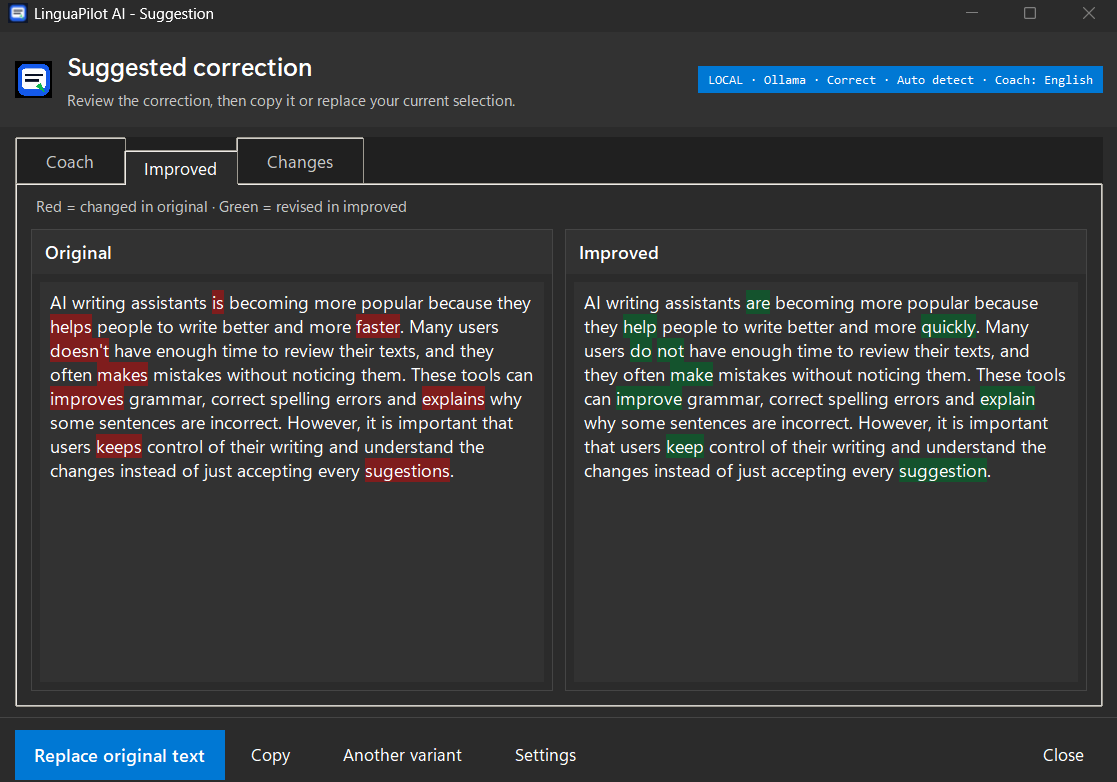
Works inside any Windows application
Local AI made easier
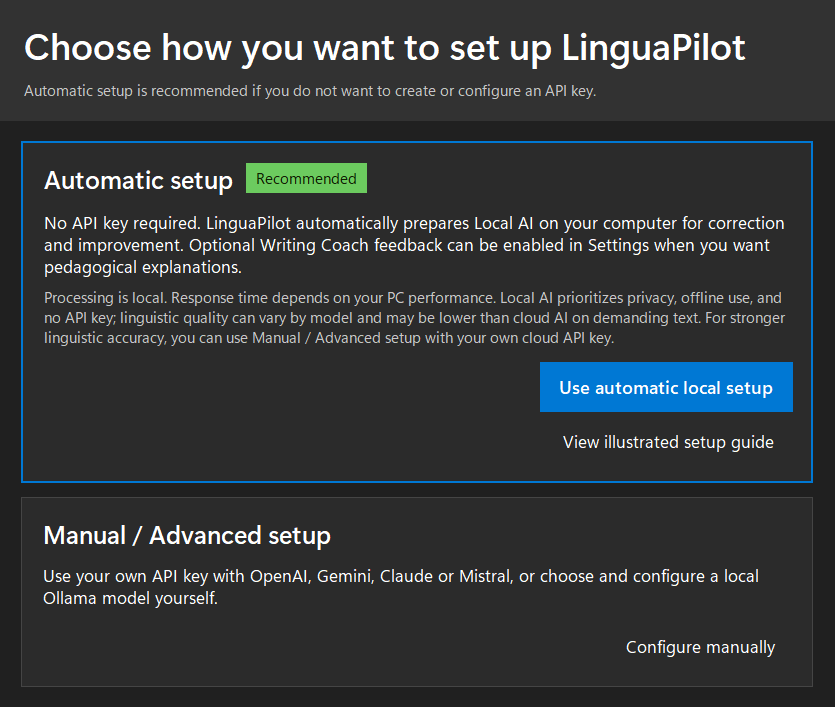
Want to keep your writing on your Windows PC? LinguaPilot offers a guided automatic setup with Ollama, or a manual path for users who prefer to choose their own model or cloud provider.
The problem
AI can make writing faster, but accepting every rewrite without reviewing it can flatten your personal style. LinguaPilot helps you compare changes and keep the final decision.
Copy → paste → send can save time, but it offers fewer chances to notice and learn from changes.
When cloud mode is used, the selected text is sent to the chosen AI provider for that request. Sensitive drafts can instead be processed locally with Ollama.
Breaking your flow to open a browser tab kills concentration and wastes time you don't have.
AI-generated rewrites can sound generic when accepted without review. Your tone, intention, and degree of certainty still deserve your attention.
Features
Correct what needs correcting, consider optional improvements, and keep your own meaning and voice at the center.
Select any text, anywhere on Windows, press Ctrl+Alt+C — the panel appears instantly. No switching apps, no copy-pasting into a browser.
Compare a light correction with an optional rewrite. Enable explanations to understand what changed and why, so you can learn without automatically replacing your own voice. Available with supported AI configurations.
Write in English, French, Arabic, Spanish, or any language — the app detects and adapts automatically. No manual switching required.
Choose a writing task such as Correct, Improve, Professional, Academic, Shorten, Expand, or Reply to email. When rewriting is allowed, adjust the tone to match your audience.
With a locally hosted Ollama model, your selected writing is processed on your PC rather than sent to a cloud AI provider. The initial software and model downloads require internet access.
Need faster responses? Optionally connect OpenAI, Google Gemini, Anthropic Claude, or Mistral AI for cloud-powered suggestions — you stay in full control of the toggle.
Use cases
LinguaPilot AI is built for real writing moments — when you need to correct, rewrite, improve and understand your text without leaving the app you are already using.
Rewrite professional emails, improve tone and fix mistakes directly inside your Windows workflow. LinguaPilot helps you sound clear and confident without turning every message into generic AI text.
Explore email writing →When privacy matters, connect LinguaPilot to Ollama and keep your writing on your own machine. Your emails, reports and drafts stay private while you still receive useful writing feedback.
Explore local AI mode →Select text in Word, Outlook, WhatsApp Desktop, Notepad, browsers or almost any text field, then press Ctrl+Alt+C. LinguaPilot opens a coaching panel without forcing you to copy-paste into a browser.
Explore Windows writing coach →LinguaPilot does not only replace your words. It explains why a sentence can be clearer, more professional or more natural, so every correction becomes a small writing lesson.
See the coaching approach →How it works
No tab-switching and no LinguaPilot account required. Response times depend on the selected model, AI provider and PC.
Highlight any sentence, paragraph, or email in any Windows application — MS Word, Outlook, WhatsApp, your browser, anything.
Hit Ctrl + Alt + C to open LinguaPilot directly from your writing workflow, without switching apps.
Review the correction, explore an optional rewrite, and read the explanation when coaching is enabled. You decide which wording still sounds like you.
One message, three choices
Sometimes a light correction is all you need. A stylistic rewrite is a choice, not a requirement.
"Hi Sam, i think the report is ready but I want to check the numbers one more time before I send it."
"Hi Sam, I think the report is ready, but I want to check the numbers one more time before I send it."
"Hi Sam, I think the report is ready. I'd like to review the numbers once more before sending it."
Illustrative example, not a guaranteed model output. Both suggestions keep the writer's uncertainty and intention; you choose whether to apply either one. Actual coaching explanations depend on the selected model and settings.
Privacy First
Keep the choice in your hands: use local AI, or review external processing before sending selected text to a cloud provider.
Available in LinguaPilot AI v2.8.4
Privacy Guard distinguishes verified local processing, cloud processing and destinations it cannot confidently verify. You can make an informed choice before a cloud or unverified writing request proceeds.
Before the first cloud or unverified writing request in a session, LinguaPilot asks for your confirmation. It asks again if you change the provider or model, or restart the app. Cancel to stop that request before your selected text is sent.
Enable Sensitive Work Mode to block writing requests using cloud or unverified destinations. Only verified local AI processing is allowed until you deliberately turn the mode off.
A safeguard for writing requests, not a system-wide internet blocker. Local processing requires a verified local setup; external AI providers apply their own privacy policies and may charge for API usage. Read our privacy policy.
Connect to Ollama to process selected text locally on your machine, without sending it to a cloud AI provider.
You choose whether to use OpenAI, Google Gemini, Anthropic Claude, or Mistral AI. For sensitive content, you can switch to Ollama and process selected text locally.
Built exclusively for Windows 10 & 11. Uses standard system APIs to integrate seamlessly with your existing workflow without disrupting anything.
No mandatory LinguaPilot account or registration, and no usage tracking by LinguaPilot. Install it, run it, own it. With Ollama, selected text can remain on your computer.
Pricing
Try it free, then get lifetime access at an exclusive launch price.
Free Trial
Full app access for 14 days
Full License
One-time purchase · Future updates included

FAQ
Ready to learn again?
Download the free trial and feel the difference in the first five minutes. No LinguaPilot account required. No cloud required with Ollama. Just a smarter way to write.